
About This Article
Calendar Links are subscription-based URLs that can be pasted into popular calendar apps or any app accepting .ics links. Once subscribed, the calendar app can follow along with your Crescat Personal Calendar, Group Calendar, and the calendars of individual teams.
Content
⚠️Calendar Update Schedule
Google and Outlook calendars (and perhaps others) ignore our instruction to update the calendar feed every 2 hours. Instead, they opt to update their user's calendars daily.
Getting Calendar Links
For Your Groups, Teams & Rooms
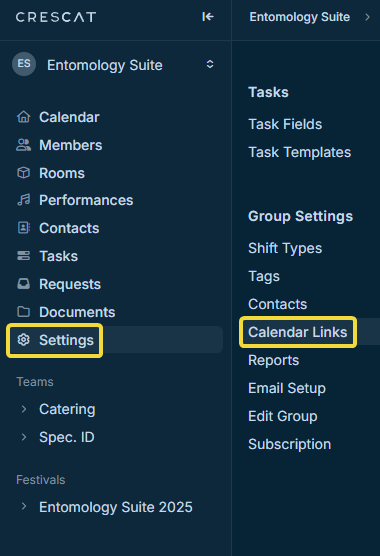
Head to your group's settings, then click Calendar Links under Group Settings.
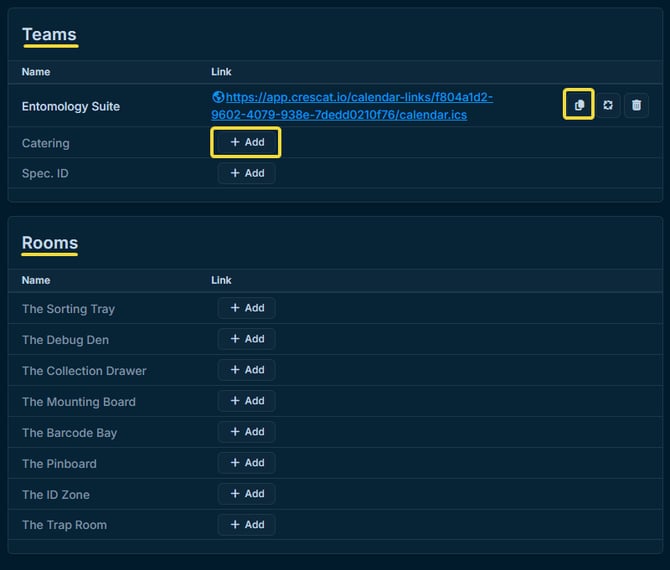
Here you can get unique calendar links for your Group, Teams, and Rooms.
Click Add to generate a Calendar Link for the relevant items, and click the Copy icon to copy a link to your device's clipboard so you can paste it into your calendar app.
Note
Rooms are a feature of Crescat Venue.
For Your Personal Calendar
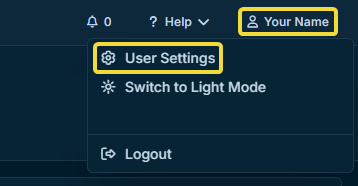
Open your User Settings located in the upper right of Crescat.
Select the Account tab, then under Integrations, you may generate your calendar link if it's not already there, or copy it if it is.
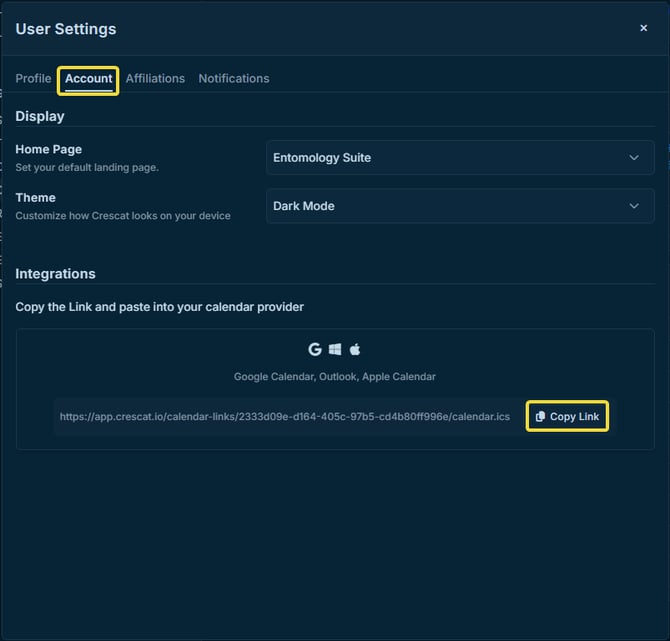
From there, you can paste it into the designated location within calendar apps that support ical or .ics URLs.
You can find out more about where to paste them by using a helpful search engine like Google, and asking where to paste a url to subscribe to a calendar within your app of choice.